Type-A to Type-A 3.0 cable
Two plugs, one at each end - an ordinary cable running from a USB Type-A port to a USB Type-A (SuperSpeed) port.
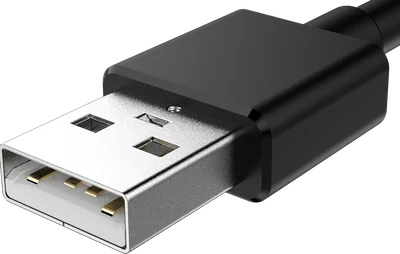
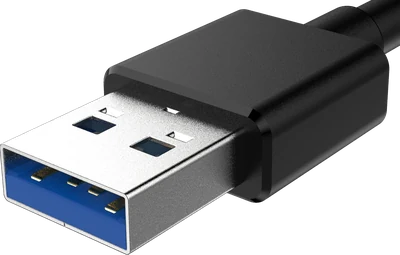
USB Type-A — plug
The flat rectangle everyone pictures when they hear “USB”.
How to recognise it
- Flat rectangle, roughly 12 mm wide and 4.5 mm tall.
- Only goes in one way up, though it famously takes three tries.
- A white or black plastic tongue inside the metal shell.
- Maximum speed:
- 480 Mbps (Hi-Speed)
- Maximum power:
- 2.5 W standard, more with proprietary charging
USB Type-A (SuperSpeed) — plug
The same rectangle as Type-A, with a blue tongue and five extra pins.
How to recognise it
- Identical outline to a normal Type-A - it is the same plug.
- The plastic tongue is usually blue; teal or red means a faster or always-on port.
- Five extra contacts sit behind the four you can see on a 2.0 plug.
- Maximum speed:
- 5 Gbps, or 10 Gbps on a USB 10Gbps port
- Maximum power:
- 4.5 W standard