Type-C to Type-A 3.0 adapter
A USB Type-C plug on one end and a USB Type-A (SuperSpeed) socket on the other. This converts a port rather than carrying a signal any distance, so it is usually a stubby dongle rather than a cable.
- A Type-A to Type-C cable can never carry the full USB-C wattage. Type-A tops out well below the 100 W and 240 W figures you will see advertised for C-to-C.
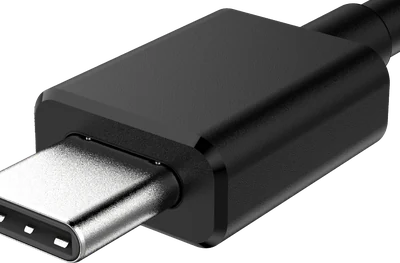
USB Type-C — plug
The small oval that goes in either way up - and hides the most variation.
How to recognise it
- Rounded oval about 8.4 mm wide, symmetrical top to bottom.
- Reversible: there is no wrong way up.
- A flat tongue with contacts on both faces sits inside the socket.
- Maximum speed:
- 480 Mbps to 80 Gbps, depending entirely on the cable
- Maximum power:
- Up to 240 W with USB PD 3.1 and an e-marked cable
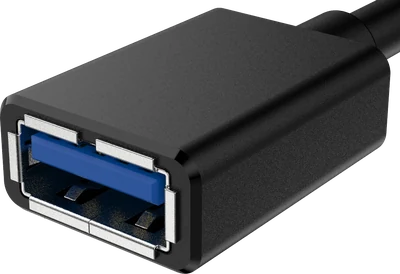
USB Type-A (SuperSpeed) — socket
The same rectangle as Type-A, with a blue tongue and five extra pins.
How to recognise it
- Identical outline to a normal Type-A - it is the same plug.
- The plastic tongue is usually blue; teal or red means a faster or always-on port.
- Five extra contacts sit behind the four you can see on a 2.0 plug.
- Maximum speed:
- 5 Gbps, or 10 Gbps on a USB 10Gbps port
- Maximum power:
- 4.5 W standard